,
-
E-mail
info@sowze.com
-
Phone
+86-755-81751007
-
Address
6th Floor, Bole industrial, Bantian Second Sub-district office, Longgang district, Shenzhen, China
Product Categories
Shenzhen Sowze Security Electronic Co., Ltd.Free·1YRS

Outdoor/vehicle Mount Ptz Camera
NegotiableUpdate on June 04
- Model
- Nature of the Manufacturer
- Other
- Product Category
- Place of Origin
- City, Province
Overview
Product Details
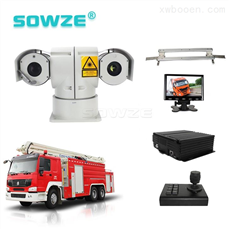
outdoor/vehicle mount ptz camera
Features:
• Vehicle PTZ camera;
• high die-cast aluminum casing,waterproof grade IP66;
• selection of high quality infrared light, the irradiation distance is up to 100 meters;
• 128 preset positions, 6 cruising tracks and 3 self-learning paths;
• Pan rotation speed 0~100°/s, tilt rotation speed 0~80°/s
• 360°continuoly rotation, the tilt angle up to 180°, auto flip
• Camera position coordination and magnified zoom display function;
• it could be widely ed for car surveillance at night and bad environment, (especially suitable for monitoring in dark district without light);
• power voltage input for car surveillance: DC12V.
• built-in surge protection and lightning protection, to effectively prevent 4000v Instantaneo current;
• Detection distance: 80M.
Resolution: 2MP 18X/20X/30X optical zoom.
Applications:
Applicable to vehicle, flow of large, temporary surveillance application environment, such as investigation, public security, fire, transportation, insurance survey claims.
Testing reports:
FAQ:
Q: What can I do when I found a problem with the product, but I can not solve it by myself?
A: Take note of the model and software version number, then submit a detailed description of the problem to the technical supporting engineers to analyze; the more detailed you have submitted, the more convenient for to analysize.
Q: How about when there is no video output from the vehicle host device?
A: 1.Check the host’s turn-on stat, if only a blue light on, it means the host is in standby stat and has not been started up yet, meanwhile check whether the host’s power cords red & yellow cords are in power supply stat or not, if only one cord is supplying power, the device is unable to start up.
2.Check the power supply stat of display screen, as well as check whether the display video has been switched to AV stat.
3 Check the connecting stat between the host’s video output cable and display screen.
4 check whether the lock stat of the host’s LOCK, it mt be locked before normal starting up.
Q: How to do when the car host video input interface is different from the camera output interface?
A: The car es 4PIN type while camera es BNC or aviation head type, if not in correspondence, please e conversion head for connection or wiring based on standard corresponding according to the cable sequence defined by the car host.
Q: How to do when the device does not conduct video recording after it is turned on and SD card has already been installed?
A: 1.Check whether the SD card has been formatted or not after installation, becae unformatted SD card cannot be ed. Enter System Menu - System Tools - Device Format to format the newly installed SD card;
2. Check to see whether video channel is closed or not, whether set a timer recording or not, it will not take video when it is not within the video recording time period.
3.Check the SD card inserting stat and whether the SD light on front panel is on or not.
Q: The video file is missing or there is no video file within a certain period of time, how to do?
A: 1. Determine the time period by analyzing the final video file before missing and the first video file after recovery.
2. Confirm whether the host is not on during that period of time, such as when the driver halfway parking, loading and unloading goods while the host is not set by video delay.
Q: When car PTZ cannot be controlled, it cannot rotate up and down, how to do?
A: Check whether PTZ protocols and baud rate are set correct, address codes are corresponding or not, whether have selected to maximize the video of the channel when control the PTZ, for example, when control the second channel, it mt maximize the screen of the second channel image to control it.GPS-related issues.
Q: GPS module exists but no coordinate information?
A: 1.Check whether GPS module exists, if it does not exist, check whether the hardware is installed or in a good .
2.Make sure that the GPS antenna s are good, whether the antenna is broken, it is recommended to be located in places with strong signal, note that some car glass shielding film will block GPS signals;
3 If the test is in the room, the signal of GPS antenna in the room will be obscured, it is recommended that the GPS antenna is placed outdoor.
Q: If e the 3G wireless module for dial-up, what do I need to pay attention to?
A: 1. Choose the built-in wireless module WCDMA or EVDO, corresponding module settings are not the same, the modules supported by different machines models are not the same, so please make sure whether your module and SIM is in correspondence. Do not e telecom SIM card on WCDMA machine;
2.Check whether the settings of Server IP and port are correct, whether 3G signal is strong enough for dialing, and then check whether the 3G dial-up is successful or not.
3. When dialing is unsuccessful, please check 3G antenna is in good or not, the dial up may fail becae of weak signal, moreover, please check whether the SIM card has enough traffic, if no traffic, dial-up will be unsuccessful.
Sales manager: Ellen Mong
/
Similar Product Recommend